

1. Overview
Microsoft 365 and Google Workspace are the two dominant cloud productivity suites for businesses of all sizes. Both provide email, calendar, document editing, video meetings, cloud storage, and team communication. Both have millions of business users globally, including a large and growing base in India.
For most growing teams, the honest answer is that either platform can work well. The decision usually comes down to three things: the software your team already uses and knows, the security and compliance requirements of your business, and the existing technology stack, particularly whether you are a Microsoft-heavy or Google-native environment.
This article is for founders, IT managers, and operations leads who need a clear comparison, not a vendor brochure for either platform. All product features and pricing should be verified directly with Microsoft and Google before making a purchasing decision, as both platforms update their offerings frequently.
2. Side-by-Side Comparison
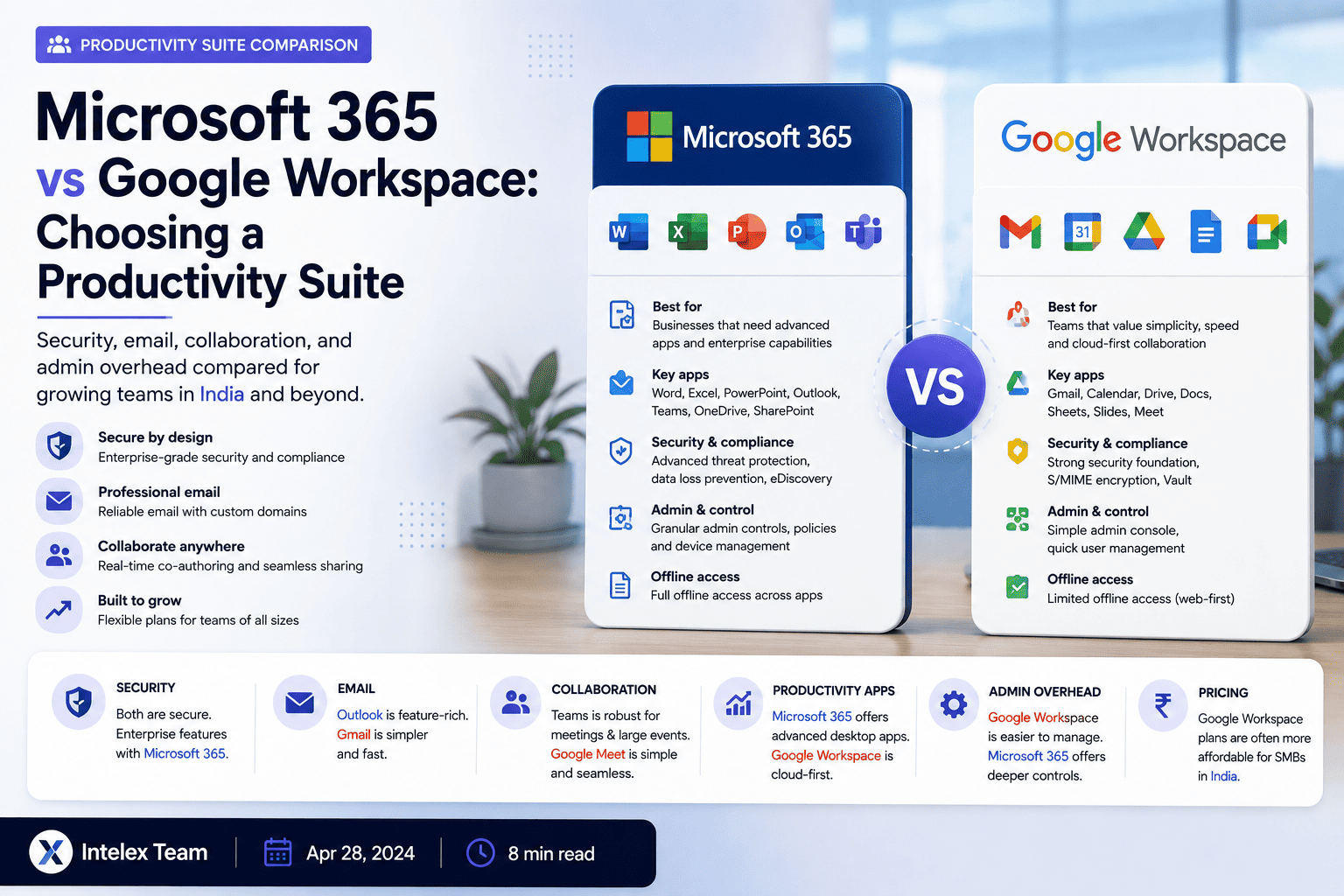
| Area | Microsoft 365 | Google Workspace |
|---|---|---|
| Outlook | Gmail | |
| Calendar | Outlook Calendar | Google Calendar |
| Word processing | Word | Google Docs |
| Spreadsheets | Excel | Google Sheets |
| Presentations | PowerPoint | Google Slides |
| Team chat | Microsoft Teams | Google Chat |
| Video meetings | Microsoft Teams | Google Meet |
| Cloud storage | OneDrive + SharePoint | Google Drive |
| Desktop apps | Full desktop apps included (most plans) | Browser-first; desktop app wrappers available |
| Offline access | Strong with desktop apps | Limited offline support in browser |
| Security & compliance | Advanced controls (higher-tier plans) | Strong fundamentals; advanced tools on higher tiers |
| Admin console | Microsoft 365 Admin Center | Google Admin Console |
| Identity | Microsoft Entra ID (Azure AD) | Google Identity |
| Best fit | Microsoft-heavy organizations, complex compliance needs | Browser-based, collaborative, startup-friendly environments |
3. Email and Calendar
Outlook vs Gmail is often the primary preference driver. Teams that have used Outlook for years generally prefer its folder structure, rule engine, and tight calendar integration. Teams that grew up on Gmail tend to prefer its label and search-first approach and typically find the transition to Outlook more jarring than vice versa.
Both email platforms are reliable and well-maintained enterprise products. The difference is largely one of workflow preference and familiarity.
For calendar scheduling, Outlook Calendar and Google Calendar are both capable. Outlook has deeper integration with Teams for meeting scheduling. Google Calendar integrates tightly with Google Meet and has a simpler, cleaner interface that many teams find easier to use for cross-organization scheduling.
4. Collaboration and Documents
Both platforms support real-time co-editing of documents, spreadsheets, and presentations.
Google Docs, Sheets, and Slides are browser-first, load quickly, and have made collaborative editing central from the beginning. For teams working primarily in the browser and sharing documents widely, they are often the smoother experience.
Microsoft Word, Excel, and PowerPoint offer significantly more depth in formatting, formula capabilities, and document complexity. For businesses that produce complex financial models in Excel, highly formatted Word documents, or sophisticated PowerPoint presentations, there is still no equivalent to the desktop versions of these applications. Microsoft 365 plans typically include the full desktop apps, which also work offline.
SharePoint provides Microsoft 365 with more sophisticated document management, permissions structures, and intranet capabilities, which can matter for organizations with complex content governance requirements.
5. Meetings and Video Calls
Microsoft Teams combines team chat, channels, video meetings, and file collaboration in one application. It is deeply integrated with the rest of Microsoft 365, making it a natural choice if the business already runs on Outlook, SharePoint, and other Microsoft tools. Teams has substantial adoption in enterprise and mid-market companies globally.
Google Meet is Google Workspace's video meeting tool, with a clean, simple interface and easy link-sharing. Google Chat handles text-based team communication. For teams that prefer simpler tooling and primarily use browser-based collaboration, Meet is capable and low-friction.
6. Security and Compliance
Both platforms invest significantly in security. The relevant question for most business buyers is not "which is more secure" in absolute terms, but which provides the controls and compliance certifications relevant to the business's requirements.
Microsoft 365 Business Premium and higher plans include a substantial security stack: Microsoft Defender, Intune for device management, Azure AD (Entra ID) for conditional access, data loss prevention, information protection, and compliance tooling. For organizations with regulatory obligations, a large device fleet, or complex access control needs, the Microsoft 365 security ecosystem can be compelling.
Google Workspace provides strong baseline security with two-factor authentication, advanced phishing and malware protection, endpoint management, and audit logging. Higher-tier plans add additional security and compliance features. For many SMEs, the security fundamentals of Google Workspace are entirely adequate.
7. Administration and IT Overhead
The Google Admin Console is generally considered simpler and faster to navigate for basic user, device, and application management. Many SMEs without a dedicated IT department find it easy to manage independently.
The Microsoft 365 Admin Center is more powerful but also more complex. Organizations with dedicated IT staff, complex device management requirements, or integration with on-premises Windows Server infrastructure will find Microsoft 365's administration tools more capable. The learning curve is steeper for smaller teams without IT support.
8. Desktop Apps vs Browser-First
This is often the most practically important distinction for businesses in India.
Microsoft 365 includes full desktop applications (Word, Excel, PowerPoint, Outlook, Teams) that work offline and provide the full feature set regardless of internet quality. In locations with variable internet connectivity, this is a significant practical advantage.
Google Workspace is designed primarily for the browser. Google Docs, Sheets, and Slides offer some offline capability through browser extensions, but the experience is more limited. Teams in areas with strong, consistent internet connectivity will find less difference; teams in locations with variable connectivity may prefer Microsoft 365's desktop apps.
9. Storage
Storage allocations change frequently across plan tiers for both platforms. Verify current storage included per user on each plan directly with Microsoft and Google before purchasing, as both platforms have revised their storage policies in recent years. For most growing teams, the storage included in standard business plans is sufficient for day-to-day use.
10. Cost Comparison
Both platforms offer multiple plan tiers. Rather than citing specific per-user pricing (which changes), the key considerations are:
- Google Workspace plans are generally straightforward with fewer tier variations for core use cases.
- Microsoft 365 plans have more tiers, with meaningful differences in security features and app inclusion between business tiers.
- For organizations that need advanced security (Defender, Intune, Entra ID), the relevant Microsoft 365 plan is at the Business Premium tier or higher, which costs more than entry-level plans.
- Factor in IT administration time: complex setups cost more to manage regardless of licence price.
Compare the total cost at the plan tier that includes the features you actually need, not just the cheapest entry-level option.
11. Which Should You Choose?
Choose Microsoft 365 if
- The team already uses Outlook or Office apps
- Complex Excel or Word work is central to operations
- On-premises Windows Server is in use
- Advanced security controls are required
- Strong offline capability is needed
- Device management (Intune) is important
- Microsoft ecosystem integrations are valuable
Choose Google Workspace if
- The team is comfortable in the browser
- Real-time collaborative editing is a primary need
- Simplicity of administration matters
- The team uses Gmail and Google products personally
- Fast setup with minimal IT overhead is important
- Document formatting complexity is not a primary need
- Google-native or Google Cloud integrations are useful
12. India Context
Both Microsoft 365 and Google Workspace have strong support and infrastructure in India, with data centres and support channels serving Indian businesses. Both platforms are widely used by Indian SMEs, growing companies, educational institutions, and enterprises.
For many Indian businesses, the decision comes down to the existing software environment. Organizations with established Windows infrastructure, Tally or SAP integrations, and Microsoft-trained staff will typically find Microsoft 365 a more natural fit. Organizations that are digitally native or growing primarily in the browser will often find Google Workspace simpler and faster to deploy.
Both platforms are available through authorized resellers and Microsoft/Google partners in India, which can provide local support, billing in INR, and assistance with setup, migration, and training.
13. Migration Considerations
Switching productivity suites is not trivial. Key considerations before migrating from one platform to the other:
- Email and calendar data: Migration tools exist for both directions, but complex Outlook configurations, shared calendars, and distribution lists require careful planning.
- File formats: Documents created in Google Docs and exported to Word, or Word documents opened in Google Docs, may not render identically. Complex formatting and macros require review.
- User training: Switching from Outlook to Gmail or vice versa requires genuine user training, not just access provisioning.
- Integrations: Third-party tools and custom integrations built on one platform need to be evaluated and potentially reconfigured.
- Licensing overlap: Plan the transition period carefully to avoid paying for both platforms longer than necessary.
14. Frequently Asked Questions
Is Microsoft 365 better than Google Workspace?
Neither is universally better. The right choice depends on the team's existing habits, technical requirements, security needs, and software ecosystem. Both are capable, well-supported enterprise platforms.
Which is cheaper, Microsoft 365 or Google Workspace?
Entry-level pricing is broadly comparable, but feature differences between plan tiers mean the "right" comparison depends on which features your business actually needs. Verify current pricing directly with Microsoft and Google.
Can we use both Microsoft 365 and Google Workspace?
Technically yes, but running two productivity suites creates confusion, dual licencing costs, and a fragmented user experience. Most businesses should choose one as the primary platform.
Is Microsoft 365 better for security?
Microsoft 365 Business Premium includes an extensive security and compliance toolkit that can be compelling for businesses with complex requirements. For SMEs with standard needs, both platforms provide strong baseline security when properly configured.
What happens to our data if we leave one of these platforms?
Both platforms provide data export tools. Plan a migration carefully and verify what data can be exported and in what formats before committing to a platform for the long term.
Which platform is better for working offline?
Microsoft 365 has a clear advantage for offline work through its full desktop applications. Google Workspace offers limited offline access through browser extensions, which is more constrained.
Is Google Workspace easier to manage than Microsoft 365?
For small teams without dedicated IT, the Google Admin Console is generally considered simpler to navigate for day-to-day user management. Microsoft 365's admin tools are more powerful but have a steeper learning curve.
For most growing businesses, either Microsoft 365 or Google Workspace can serve the organization effectively. The decision matters most when there are specific security, compliance, or integration requirements that favour one platform, or when one platform's applications are already deeply embedded in how the team works. Intelex can help teams evaluate, deploy, and migrate productivity platforms.
Talk to Intelex about your productivity suite